


MediaElement
Shiny.Maui.Controls.MediaElement plays local and remote audio and video on iOS, Android, Windows, Mac Catalyst and macOS AppKit, with a companion Shiny.Maui.Controls.MediaElement.Linux for the GTK4 head and Shiny.Blazor.Controls.MediaElement for the web. One API across all six; each sits on the platform’s real player — AVPlayer, Media3/ExoPlayer, Windows.Media.Playback, GtkMediaFile, and HTML5 media.
Two decisions shape the whole control.
The transport bar is drawn by Shiny, not handed to the platform. That is the only way each piece of it can be shown or hidden on its own: native transport UI is all-or-nothing everywhere except Windows — iOS’s AVPlayerViewController has a single showsPlaybackControls, HTML5’s controlsList can only subtract download/fullscreen/cast and only in Chromium, and GTK’s GtkMediaControls has no knobs at all. Drawing it also means one look on every target, themed from your Shiny theme pack.
The player outlives the view. An IMediaPlayerBackend owns the platform player and the view is pushed into it. That is what makes the two hard features work rather than being approximations: entering fullscreen hands the same running player to a second surface on a modal page, so nothing re-buffers and your layout is left alone; and backgrounding detaches the video surface entirely while the audio keeps going.
- Transport Bar — showing and hiding each control, styling, commands
- Background Playback & PiP — lock-screen audio, Picture-in-Picture, and the manifest opt-ins your app must make
- Blazor Usage — the WebAssembly specifics
MAUI


Blazor
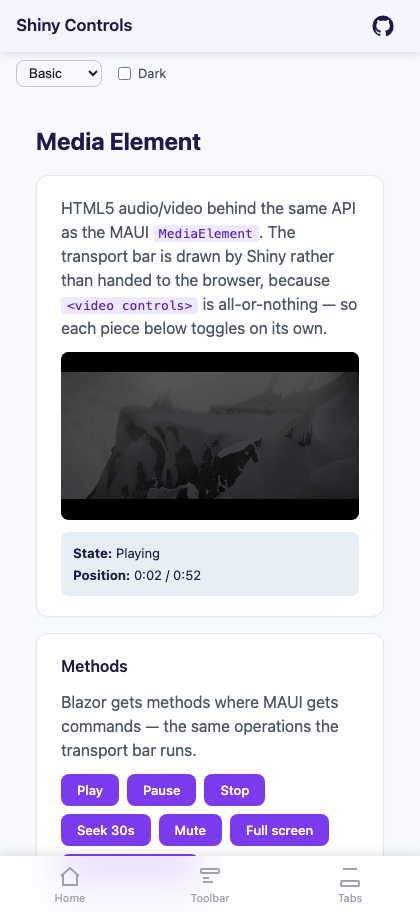
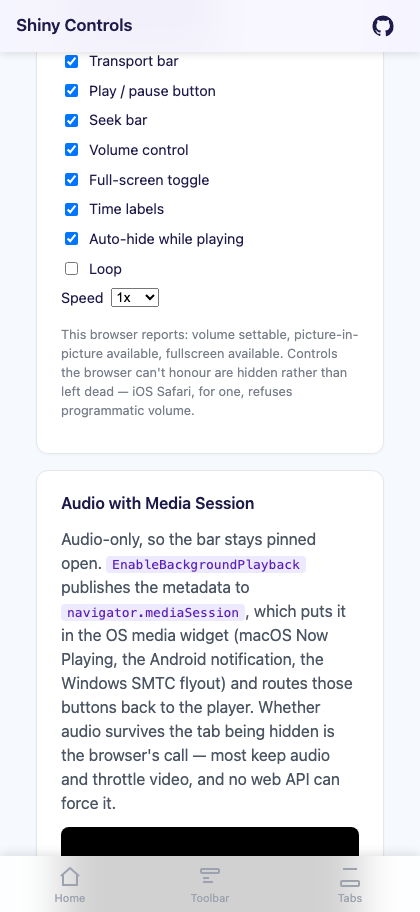
| Video playing with the transport bar | Transport pieces toggled independently | Audio with media session |
|---|---|---|
 |
 |
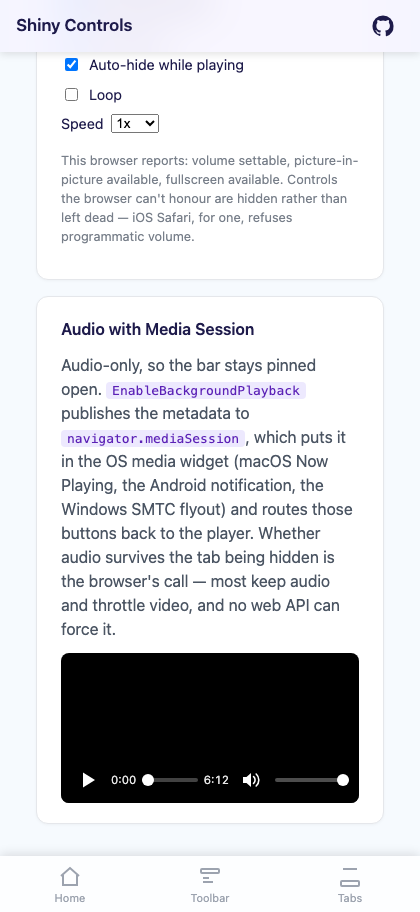 |
Left to right: the full transport bar; the same player with ShowVolumeControl, ShowTimeLabels and ShowFullScreenButton switched off — the scrubber takes the freed space; and fullscreen, which carries on from the same position because it shares the running player.



dotnet add package Shiny.Maui.Controls.MediaElementbuilder .UseShinyControls() .UseShinyMediaElement();xmlns:media="http://shiny.net/maui/media"<media:MediaElement Source="https://example.com/clip.mp4" AutoPlay="True" Aspect="AspectFit" HeightRequest="220" />The types live in Shiny.Maui.Controls.Media; the enums and DTOs shared with Blazor (MediaElementState, MediaAspect, MediaMetadata, MediaPlaybackCapabilities) live in Shiny.Controls.Media and are surfaced under the same XAML namespace.
Linux (GTK4)
Section titled “Linux (GTK4)”There is no Linux target framework, so the GTK backend ships as its own package — otherwise referencing GirCore would drag GTK into every non-platform consumer of the main package’s net10.0 build. It replaces the normal registration rather than supplementing it:
dotnet add package Shiny.Maui.Controls.MediaElement.Linuxbuilder.UseShinyMediaElementGtk(); // instead of UseShinyMediaElement()Decoding comes from GStreamer through GTK’s media backend, so the machine needs gtk4-media-gstreamer (Fedora/Arch) or libgtk-4-media-gstreamer (Debian/Ubuntu), plus codec plugins for whatever you play. Without it the control still lays out and reports a load failure through MediaFailed.
Sources
Section titled “Sources”Source is a MediaSource with a TypeConverter, so a bare string in XAML is classified for you:
| You write | You get | Plays from |
|---|---|---|
https://…, http://…, an HLS or DASH manifest |
UriMediaSource |
the network |
a rooted path, or file:///… |
FileMediaSource |
the device filesystem |
anything else — intro.mp4, clips/intro.mp4 |
ResourceMediaSource |
a Resources/Raw file in the app package |
Or build them explicitly:
player.Source = MediaSource.FromUri("https://example.com/clip.mp4");player.Source = MediaSource.FromFile(downloadedPath);player.Source = MediaSource.FromResource("intro.mp4");Each backend resolves the packaged form to its own scheme — asset:/// on Android, the app bundle on Apple, ms-appx:/// on Windows, the app directory on GTK.
Properties
Section titled “Properties”| Property | Type | Default | Notes |
|---|---|---|---|
Source |
MediaSource |
null | see above |
AutoPlay |
bool | false | play as soon as the source opens |
IsLooping |
bool | false | suppresses MediaEnded |
Volume |
double | 1 | clamped 0..1 |
IsMuted |
bool | false | independent of Volume |
PlaybackRate |
double | 1 | clamped 0.25..4 |
Position |
TimeSpan | 0 | two-way — read back every PositionUpdateInterval, and assigning it seeks |
Duration |
TimeSpan | 0 | read-only; zero until the source opens, and for live streams |
CurrentState |
MediaElementState |
None | None / Opening / Buffering / Playing / Paused / Stopped / Failed |
VideoSize |
Size |
0 x 0 | read-only — pixel size of the video track; zero until it is known and for audio-only media |
BufferedProgress |
double | 0 | 0..1, drawn as the scrubber’s secondary track |
Aspect |
MediaAspect |
AspectFit | AspectFit / AspectFill / Fill |
KeepScreenOn |
bool | false | inhibit display sleep while playing |
PositionUpdateInterval |
TimeSpan | 250ms | how often the playhead is polled |
IsFullScreen |
bool | false | two-way |
EnableBackgroundPlayback |
bool | false | see Background Playback |
Metadata |
MediaMetadata |
null | Title / Artist / Album / ArtworkUri for the OS transport UI |
Capabilities |
MediaPlaybackCapabilities |
None | read-only — what this backend actually honours |
Position deserves a note: the control polls the player rather than each backend pushing, so every platform ticks at the same rate. The tick writes the player’s own position into the property, and an outside write is what means “seek” — so binding Position two-way to a view model doesn’t fight the player.
Events: StateChanged, MediaOpened, VideoSizeChanged, MediaEnded, MediaFailed, PositionChanged, SeekCompleted, FullScreenChanged, PictureInPictureChanged.
Sizing the player to the video
Section titled “Sizing the player to the video”Aspect decides how the image is scaled into the control; it cannot change the control’s own shape. So a player given a fixed height plays a portrait clip fitted to that height — a narrow sliver down the middle of an otherwise empty box. When the sources vary (user recordings, a mixed library), read VideoSize and size the layout to what is actually playing.
<media:MediaElement x:Name="Player" Source="{Binding Clip}" Aspect="AspectFit" />this.Player.VideoSizeChanged += (_, size) =>{ if (size.Height > 0 && this.Player.Width > 0) this.Player.HeightRequest = this.Player.Width * (size.Height / size.Width);};VideoSize is cleared to zero when a new Source is assigned, so a layout sized to the previous clip does not hold that shape over the new one while it loads.
Fullscreen
Section titled “Fullscreen”IsFullScreen, ToggleFullScreen() and ToggleFullScreenCommand push a modal page carrying a second surface bound to the same player. Playback continues rather than restarting, the inline control keeps its place in your layout, and Android’s back gesture collapses it. FullScreenChanged fires however it was triggered.
The alternative — reparenting the control into an overlay — would recreate its platform view, which for a video surface means a visible stall and a fresh buffer on a remote stream.
Player lifetime
Section titled “Player lifetime”The native player is created when the element’s handler connects, not in its constructor — so a MediaElement has to be in the visual tree to play, and a template instance or view that is built but never shown holds nothing. Source, volume, mute, rate, looping and an earlier Play() are applied at that moment; Pause()/Stop() before it cancel the pending play. Disconnecting the handler disposes the player, and showing the element again creates a fresh one and re-opens Source. Capabilities reads None until a handler exists.
Capabilities
Section titled “Capabilities”Support genuinely differs by platform, so read Capabilities before offering an affordance. The built-in transport bar already hides what the backend can’t do.
| Background audio | Picture-in-Picture | Playback rate | Volume | Buffer progress | |
|---|---|---|---|---|---|
| iOS / Mac Catalyst | ✅ | ✅ | ✅ | ✅ | ✅ |
| Android | ✅ | ✅ (API 26+) | ✅ | ✅ | ✅ |
| Windows | ✅ (SMTC) | ❌ | ✅ | ✅ | ✅ |
| macOS AppKit | ✅ | ❌ | ✅ | ✅ | ✅ |
| Linux GTK4 | ❌ | ❌ | ❌ | ✅ | ❌ |
| Blazor | browser’s call | ✅ where available | ✅ | ⚠️ probed | ✅ |
- Windows has no per-element Picture-in-Picture API. The nearest thing, a compact-overlay
AppWindow, shrinks the whole app window rather than detaching the video, so it isn’t offered as PiP. - macOS AppKit could do PiP through AVKit, but the MAUI AppKit host is preview-quality and it is untested there — the capability is deliberately not advertised rather than offering a button that may do nothing.
- Linux continues playing while the window is hidden, because a desktop process is never suspended; there are no OS transport controls, though, so
BackgroundAudioisn’t claimed. There is no MPRIS integration yet,GtkMediaStreamhas no rate control, and it reports no buffered-ahead figure. - Blazor probes volume at runtime by writing a value and reading it back, because iOS Safari silently ignores writes to
video.volumeand nothing advertises that.
Substituting the player
Section titled “Substituting the player”MediaPlayerBackends.Factory is the hook every MediaElement uses to create its player — a static hook rather than DI because a control declared in XAML has no service provider, and because the GTK head has to replace it from a different assembly.
MediaPlayerBackends.Factory = () => new MyBackend();Implement IMediaPlayerBackend to plug in your own player, or a fake so the control’s own logic can be tested with no device attached.