


ProgressBar
A progress bar control with gradient fill and a configurable Vista-style shimmer pulse that sweeps left-to-right across the filled portion of the bar. Supports determinate, indeterminate, text overlay, and timed/value-triggered pulse animations.


Frameworks
.NET MAUI
Blazor
MAUI


Blazor
| Gradient fill and text | Indeterminate and pulse |
|---|---|
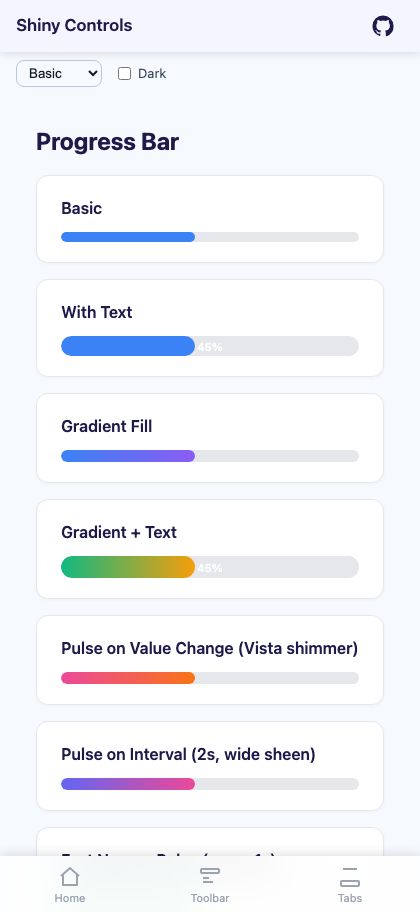 |
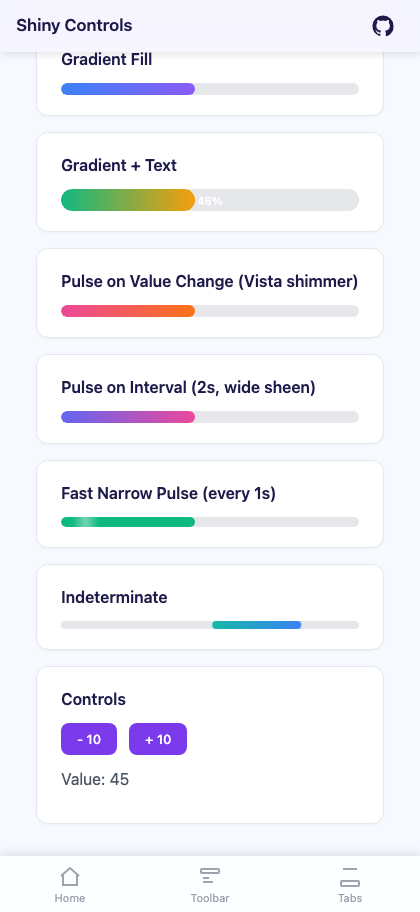 |
| Segments | Segments + gradient |
|---|---|
 |
 |
Features
Section titled “Features”| Feature | Description |
|---|---|
| Gradient Fill | Linear gradient from GradientStartColor to GradientEndColor across the filled bar. |
| Vista-Style Shimmer Pulse | A translucent highlight sweeps left-to-right across the bar. Configurable width (PulseLength) and speed (PulseSpeed). |
| Pulse Triggers | Pulse on every value change (PulseOnValueChange) or on a repeating timer (PulseInterval). |
| Text Overlay | Show percentage or custom-formatted text centered on the bar. |
| Indeterminate Mode | A sliding bar animation for unknown progress. |
| Segments | Split the bar into separate steps (Segments, SegmentSpacing) instead of one solid bar. |
| Standard Properties | Value, Minimum, Maximum, TrackColor, BarColor, TrackHeight, CornerRadius. |
Basic Usage
Section titled “Basic Usage”.NET MAUI
Section titled “.NET MAUI”<shiny:ProgressBar Value="{Binding Progress}" TrackHeight="12" CornerRadius="6" UseGradient="True" GradientStartColor="#3B82F6" GradientEndColor="#8B5CF6" PulseEnabled="True" PulseOnValueChange="True" PulseLength="0.4" PulseSpeed="800" />Blazor
Section titled “Blazor”<ProgressBar Value="@progress" TrackHeight="12" CornerRadius="6px" UseGradient="true" GradientStartColor="#3B82F6" GradientEndColor="#8B5CF6" PulseEnabled="true" PulseOnValueChange="true" PulseLength="0.4" PulseSpeed="800" />Properties
Section titled “Properties”| Property | Type (MAUI / Blazor) | Default | Description |
|---|---|---|---|
| Value | double | 0 | Current progress value (TwoWay) |
| Minimum | double | 0 | Minimum value |
| Maximum | double | 100 | Maximum value |
| TrackColor | Color / string | #E5E7EB | Background track color |
| BarColor | Color / string | #3B82F6 | Fill color when gradient is disabled |
| TrackHeight | double | 8 | Track height in pixels |
| CornerRadius | double / string | 4 / “4px” | Corner radius |
| UseGradient | bool | false | Enable gradient fill |
| GradientStartColor | Color / string | #3B82F6 | Left gradient color |
| GradientEndColor | Color / string | #8B5CF6 | Right gradient color |
| PulseEnabled | bool | false | Enable shimmer pulse |
| PulseOnValueChange | bool | true | Trigger pulse when Value changes |
| PulseInterval | TimeSpan | 0 | Repeating pulse timer (e.g. 2 seconds) |
| PulseColor | Color / string | White / “rgba(255,255,255,0.4)” | Shimmer color |
| PulseOpacity | double | 0.4 | Peak shimmer opacity (MAUI only) |
| PulseLength | double | 0.4 | Width of shimmer as fraction of fill (0.05–1.0) |
| PulseSpeed | int | 800 | Milliseconds for one left-to-right sweep |
| ShowText | bool | false | Show text overlay |
| TextFormat | string | “{0:0}%” | Format string (receives percentage 0–100) |
| TextColor | Color / string | White | Text color |
| FontSize | double | 11 | Text font size |
| IsIndeterminate | bool | false | Enable indeterminate animation |
| Segments | int | 0 | Split the bar into this many steps; 0/1 = continuous |
| SegmentSpacing | double | 4 | Gap between segments |
Events & Commands
Section titled “Events & Commands”| Name | Type | Description |
|---|---|---|
| ValueChangedEvent | EventHandler<double> | Fires when Value changes (MAUI) |
| ValueChanged | EventCallback<double> | Fires when Value changes (Blazor) |
| ValueChangedCommand | ICommand | Command fired on value change (MAUI) |
Examples
Section titled “Examples”Simple with text
Section titled “Simple with text”<shiny:ProgressBar Value="75" TrackHeight="20" CornerRadius="10" ShowText="True" />Gradient with pulse on interval
Section titled “Gradient with pulse on interval”<shiny:ProgressBar Value="{Binding DownloadProgress}" UseGradient="True" GradientStartColor="#6366F1" GradientEndColor="#EC4899" PulseEnabled="True" PulseOnValueChange="False" PulseInterval="0:00:02" PulseLength="0.6" PulseSpeed="1200" />Fast narrow pulse
Section titled “Fast narrow pulse”<shiny:ProgressBar Value="{Binding UploadProgress}" BarColor="#10B981" PulseEnabled="True" PulseOnValueChange="False" PulseInterval="0:00:01" PulseLength="0.2" PulseSpeed="500" />Indeterminate (loading)
Section titled “Indeterminate (loading)”<shiny:ProgressBar IsIndeterminate="True" UseGradient="True" GradientStartColor="#14B8A6" GradientEndColor="#3B82F6" />Blazor indeterminate
Section titled “Blazor indeterminate”<ProgressBar IsIndeterminate="true" UseGradient="true" GradientStartColor="#14B8A6" GradientEndColor="#3B82F6" />Segments (Steps)
Section titled “Segments (Steps)”
Set Segments to split the bar into separate steps with a gap between them instead of one solid bar - the stepped look of a delivery tracker or a multi-stage upload. 0 (the default) or 1 draws the continuous bar.
<shiny:ProgressBar Value="{Binding CompletedStops}" Maximum="11" Segments="11" SegmentSpacing="6" TrackHeight="12" CornerRadius="6" BarColor="#22A33A" /><ProgressBar Value="@completedStops" Maximum="11" Segments="11" SegmentSpacing="6" TrackHeight="12" CornerRadius="6px" BarColor="#22A33A" />- The fill runs across the steps in order, so a value part-way through a step lights that step partially. For whole steps, make
Maximum(or the value’s step size) line up with the segment count -Maximum="11" Segments="11", orSegments="10"with a value moving in 10s. TrackColor,BarColorandCornerRadiusapply to each step. A gradient is spread across the run: each step is painted with the gradient’s colour at its centre.- The fill slide still animates, and it travels step by step through the gaps.
ShowTextcentres the text over the whole bar.- Indeterminate mode and the pulse sheen always use the continuous bar.
How the Pulse Works
Section titled “How the Pulse Works”The pulse is a Vista-style shimmer sweep – a translucent gradient highlight (transparent -> color -> transparent) that animates from the left edge to the right edge of the filled portion.
| Platform | Details |
|---|---|
| MAUI | A BoxView with a LinearGradientBrush animates TranslationX across the fill, clipped by a parent container. |
| Blazor | A CSS ::after pseudo-element with linear-gradient animates via @keyframes from left to right. |
Configure the look:
PulseLengthcontrols width:0.2= narrow beam,0.6= wide glow,1.0= full bar flash.PulseSpeedcontrols animation duration:500= fast,1200= slow and smooth.PulseColor/PulseOpacitycontrol the highlight appearance.