Document Viewer
DocumentView renders .docx. It is read-only — editing is
Document Editor — and it ships in the same packages as the
Spreadsheet and the Slide Viewer.


Shiny.Blazor.Controls.Office bundles Carlito and Caladea — metric-compatible with Calibri
and Cambria respectively — as eight faces under SIL OFL 1.1, about 1 MB compressed. They load
automatically on the first render of any Office view, once per browser session, and are HTTP-cached
afterwards.
This is not cosmetic. SkiaSharp on WebAssembly has no access to system fonts at all — there is no
fontconfig and no CoreText in the browser — and SKTypeface.FromFamilyName returns a
wrong-but-non-null fallback rather than failing. Without the bundle, every document renders in one
monospace face and any glyph outside that face’s coverage draws as a tofu box, with no error anywhere.
Metric-compatible means the glyph advance widths match the original, so a document laid out against Calibri breaks its lines in exactly the same places against Carlito. A merely similar-looking font would render legibly and paginate differently.
To add a face the bundle does not cover:
OfficeFonts.Register(await http.GetByteArrayAsync("fonts/MyFont.ttf"));On MAUI no bundle is needed: the platform’s own fonts are available, with the same substitution table layered on top.
This note covers every Office view, the Spreadsheet and Slide Viewer included.
Reflow, not pagination
Section titled “Reflow, not pagination”using var document = await WordDocument.OpenAsync("/path/report.docx");<office:DocumentView Document="{Binding Document}" Zoom="1.0" /><div style="height:520px"> <DocumentView Document="document" Theme="DocumentTheme.Dark" /></div>Content is laid out as one continuous column at the control’s width. There are no page breaks, no headers and no footers.
That is a deliberate choice rather than an omission. Pagination needs widow and orphan control,
footnote placement, floating-object collision and repeating table headers; a partial implementation
puts page boundaries in the wrong places, and a page break in the wrong place reads as a rendering bug
rather than a missing feature. WordDocument.Page reports the authored page size and margins so the
view can pick a sensible measure — it is not a promise of pages.
What it resolves
Section titled “What it resolves”The full style chain: document defaults, then the named style with its entire basedOn ancestry
applied outermost-first, then direct formatting on the paragraph and run. Skipping the ancestry is
the usual shortcut, and it is why documents built on custom styles render in the wrong font — a style
that only overrides colour inherits everything else from its parent.
Beyond that: bold, italic, underline, strike, colour, highlight, superscript and subscript; alignment
and justification; indents and hanging indents; line and paragraph spacing; numbered and bulleted
lists with running counters resolved from numbering.xml; tables with column spans, vertical merges
and cell shading; inline images; and hyperlink colouring.
Outline and navigation
Section titled “Outline and navigation”foreach (var (level, text) in document.Outline()) Console.WriteLine(new string(' ', level * 2) + text);
view.Controller?.ScrollToHeading(index); // index into Outline()view.Controller!.Zoom = 1.25;document.PlainText;Dark mode
Section titled “Dark mode”Theme is nullable, and unset means follow the host — the app’s light/dark appearance on MAUI,
the page’s color-scheme on Blazor — keeping up live when that flips. Pass DocumentTheme.Light or
DocumentTheme.Dark only to pin one.
DocumentTheme.Dark darkens the page and adapts the document’s own colours for contrast, keeping
their hue: black body text lifts to light grey, blue headings stay blue, red stays red. A colour that
already contrasts is left exactly as authored, so the adaptation is invisible on the light theme. Set
OverrideDocumentColors = true to force every colour to Text instead — legible, but it flattens
headings and warnings to one grey.
The Slide Viewer deliberately does not do this: a slide is an artboard with authored colours, so only its surround darkens.
Finding out what was skipped
Section titled “Finding out what was skipped”The viewer preserves the whole package and reports what it could not draw:
var collector = new UnsupportedFeatureCollector();using var document = await WordDocument.OpenAsync(path, collector);
foreach (var feature in collector.Features)    Console.WriteLine($"{feature.Part}: {feature.Feature} ({feature.Severity})");
A viewer never reports Lossy — it does not write. Opening and saving produces a byte-identical file.
Not implemented
Section titled “Not implemented”- Editing. Read-only; see Document Editor.
- Pagination, headers, footers, footnotes, endnotes and comments. Tracked insertions render as
normal text; deletions are hidden. The Document Editor’s print layout
paginates and draws headers, footers, footnotes, comment balloons and tracked changes — open the
document there (read-only via its Viewing mode) when you need them. For a PDF of a document with
no view at all,
DocumentPdfExporter.Export(document, stream, options)inShiny.Controls.Office.Skiawrites one page per printed page. - Text wrapping around floating images, and tab stops — a tab becomes four spaces.
- Charts and SmartArt: reported, not drawn.
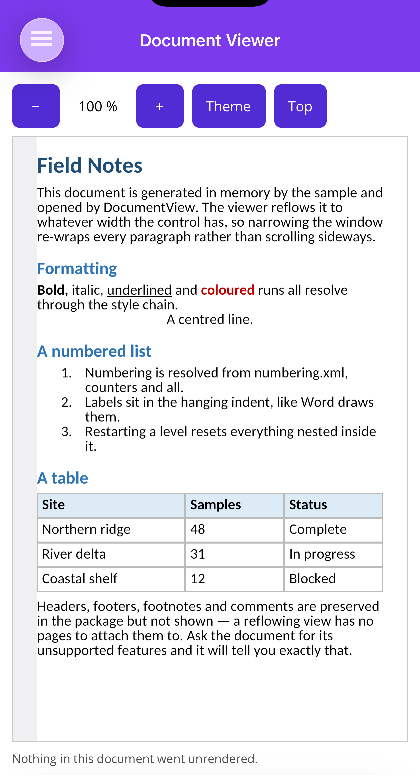
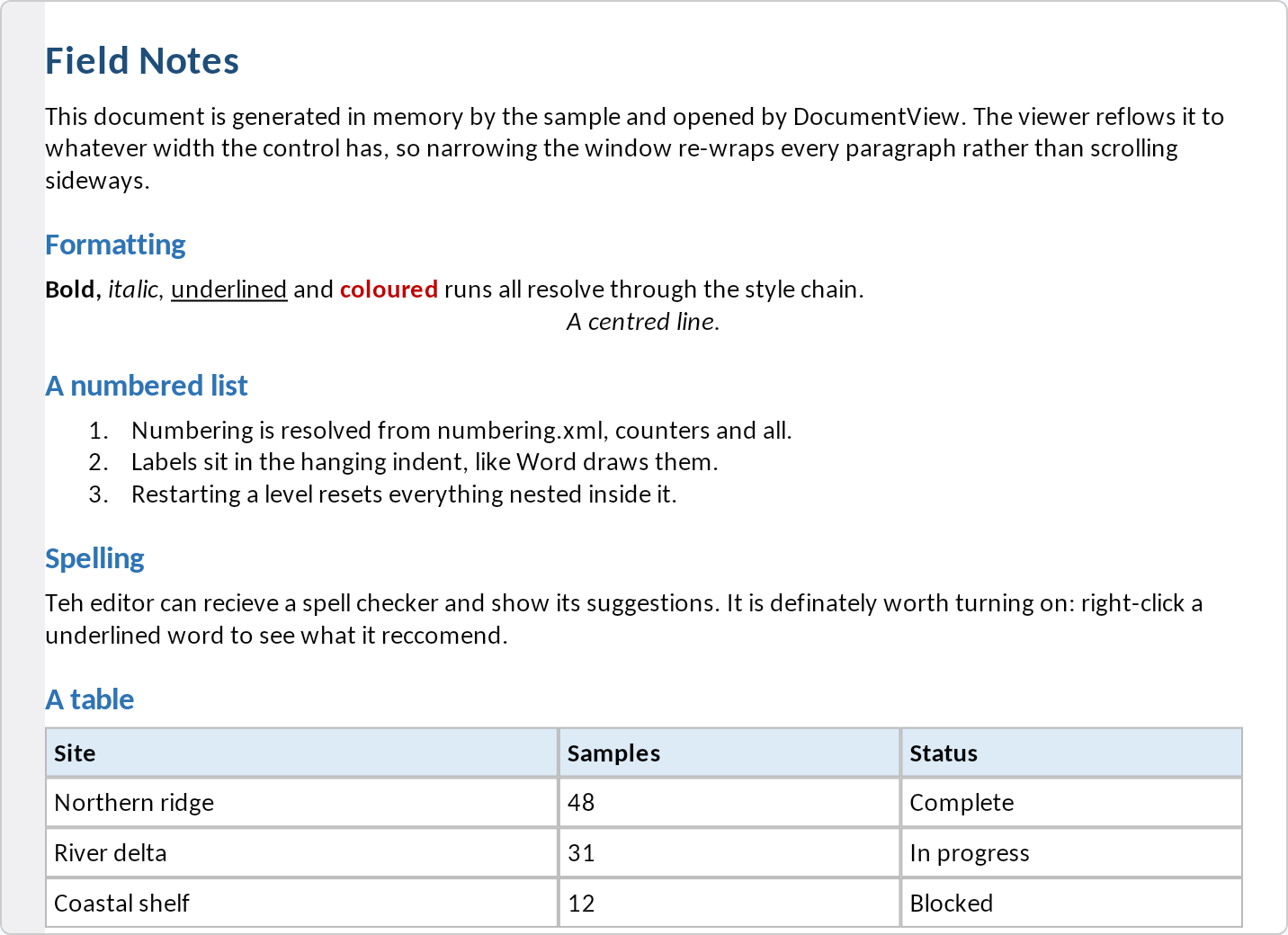
Screenshots
Section titled “Screenshots”| MAUI — DocumentView | Blazor — DocumentView |
|---|---|
 |
 |