


AgentView and A2UI Surfaces for .NET MAUI and Blazor

Shiny Controls 2.5 adds two controls for building agent UI on .NET MAUI and Blazor:
- AgentView renders a conversation with an AI agent from an AG-UI event stream: streaming markdown, reasoning, tool calls, sub-agents, interrupts, shared state and errors.
- A2UISurfaceView renders A2UI v1.0 surfaces, the declarative UI an agent describes, with real Shiny controls.
Both are pure MAUI views (iOS, Android, Mac Catalyst, macOS, Windows, Linux) and pure Razor components (WebAssembly, Server, Hybrid). There are no WebViews.



Try them live:
- Blazor Playground: Agent View and A2UI Gallery.
- MAUI web sample: shinyorg.github.io/mauiplatforms, under the Shiny Controls tab. The MAUI controls run in the browser on Platform.Maui.Web.
| MAUI | Blazor |
|---|---|
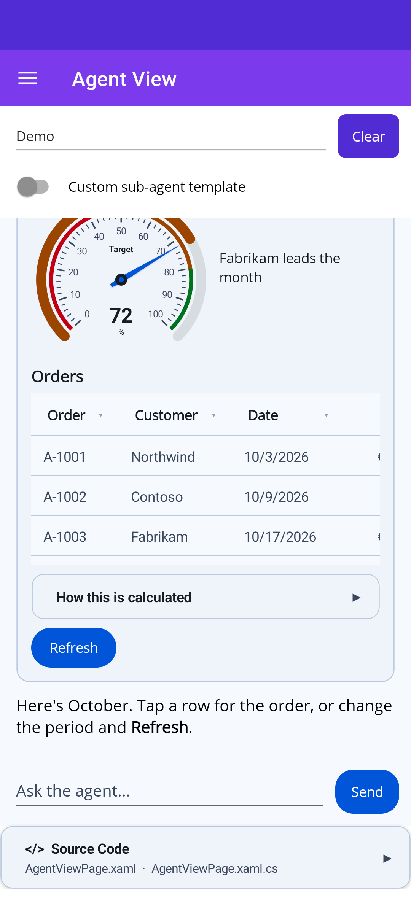 |
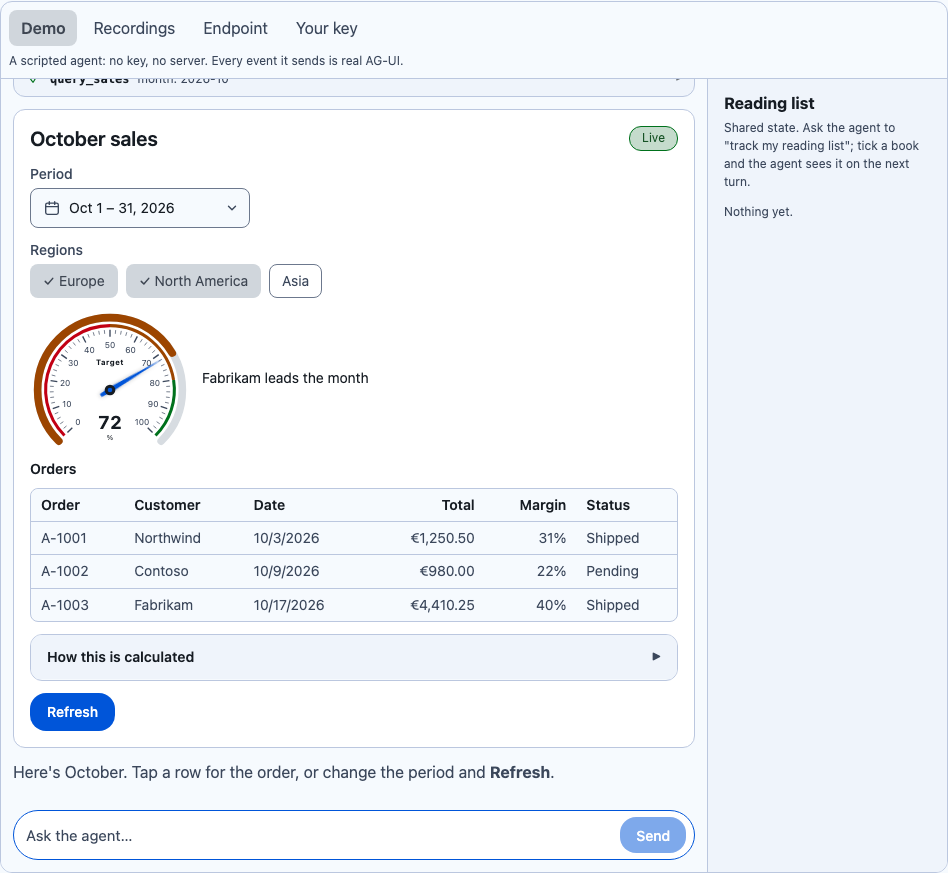 |
AgentView
Section titled “AgentView”AgentView takes an IAgentSession, which runs one AG-UI run and streams back the official SDK’s BaseEvents. The
control never sees an HttpClient, a model or an IChatClient, so the agent can be anything that produces AG-UI
events.
MAUI
<shiny:AgentView x:Name="Agent" PlaceholderText="Ask anything…" ShowReasoning="Collapsed" />var prompts = new AgentPromptQueue();Agent.Prompts = prompts;Agent.Tools = new AgentToolRegistry().AddAll(prompts); // confirm, choose, date, date range, textAgent.Session = AgentSession.Create("thread-1", myTransport.SendAsync);Blazor
@using Shiny.Blazor.Controls.Agents@using Shiny.Controls.AgentUI
<AgentView Session="@session" Tools="@tools" Prompts="@prompts"           Suggestions="@(["Show me the sales dashboard", "Book a trip"])"           StateChanged="OnStateChanged" />
What it draws:
- Markdown that streams in token by token, coalesced to about 30 updates a second. The Markdown add-on rebuilds only the block that changed.
- Reasoning,
Hidden,Collapsed(a “Thought for 4s” row, the default) orExpanded. - Tool call cards with live arguments, a spinner, then ✓ or ✕ and expandable JSON.
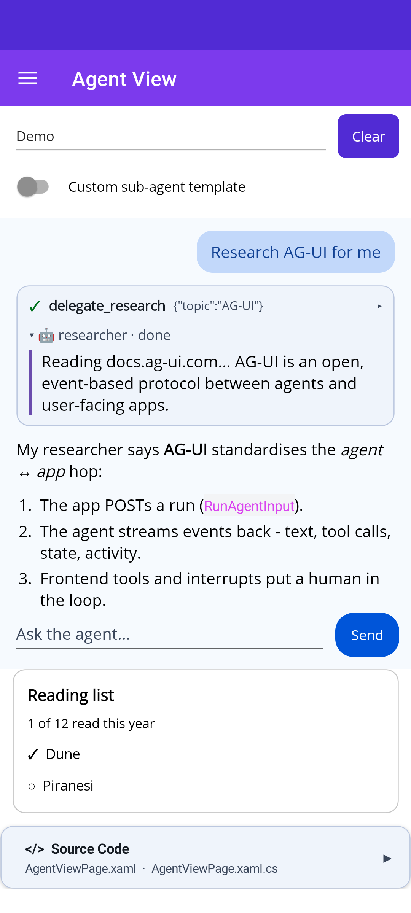
- Sub-agents nested inside the turn, and a breadcrumb of the current step (
ShowSteps). - Interrupts, errors with Retry, and Send that turns into Stop.
- A2UI surfaces, through A2UISurfaceView.
- Shared state from
STATE_SNAPSHOT/STATE_DELTA, exposed asStatewith aStateChangedevent.
Every piece can be replaced with a template: UserMessageTemplate, AssistantMessageTemplate,
ToolCallTemplates[name], ActivityTemplates[type], InterruptTemplate, ErrorTemplate and SubagentTemplate.
Sessions
Section titled “Sessions”| Source | How |
|---|---|
| Shiny.AiConversation | AgentSession.Create(session.SessionId, session.RunAgUiAsync) (Shiny.AiConversation.AgUi) |
| An AG-UI endpoint over HTTP + SSE | Post RunAgentInput and read the stream with AGUI.Client (sample: HttpAgentSession.cs) |
Any IChatClient, in-process |
AGUI.Server’s AsAGUIEventStreamAsync, which has no ASP.NET Core dependency and runs in WebAssembly (sample: ChatClientAgentSession.cs) |
| Recorded AG-UI streams | Replay .sse files (sample: ReplayAgentSession.cs) |
| Your own code | Implement IAgentSession.RunAsync(RunAgentInput, CancellationToken) |
Frontend tools answered by real controls
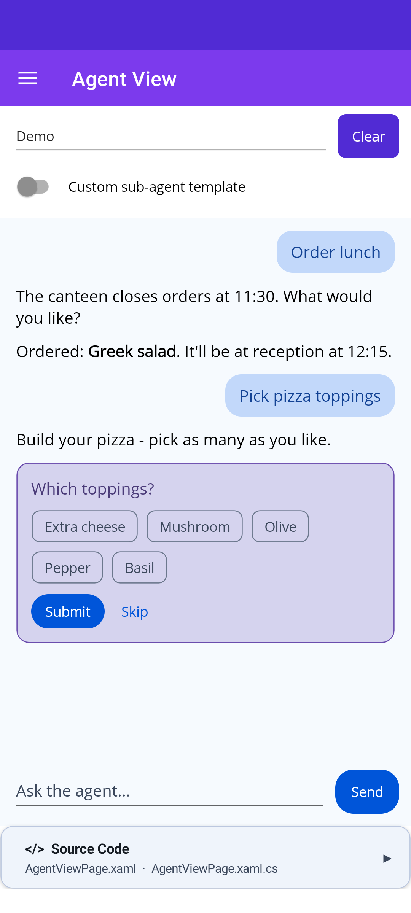
Section titled “Frontend tools answered by real controls”When the agent needs input, it can call a frontend tool, and AgentView draws a real Shiny control inline under the
tool card. When the user answers, the result goes back to the agent and the run continues. AddAll(prompts)
registers all six built-in tools:
| Tool | Prompt | Result |
|---|---|---|
confirm |
Two buttons | {"confirmed": bool} |
choose_one |
One button per option | {"choice": "..."} |
choose_many |
ChipGroup + Done | {"choices": [...]} |
pick_date |
Calendar | {"date": "YYYY-MM-DD"} |
pick_date_range |
The range picker (with min/max) |
{"start": "...", "end": "..."} |
ask_text |
Entry / text area | {"text": "..."} |
tools.Add(AgentUiTools.DateRange(prompts)); // one built-in tooltools.Add(prompts.CreateTool("pick_color", "Ask for a colour", "color", schema)); // your own prompt kindDeclining a prompt sends a failed tool result (“The user declined.”), and Stop withdraws a waiting prompt.
AG-UI interrupt outcomes render as choice buttons or chips, a text reply, or Approve / Reject, depending on the
interrupt’s metadata and responseSchema. When several are pending, every answer goes back in one resume.
Shiny.AiConversation’s ask_user questions arrive as choice interrupts.
| Frontend tool | One choice | Several choices | Sub-agent & shared state |
|---|---|---|---|
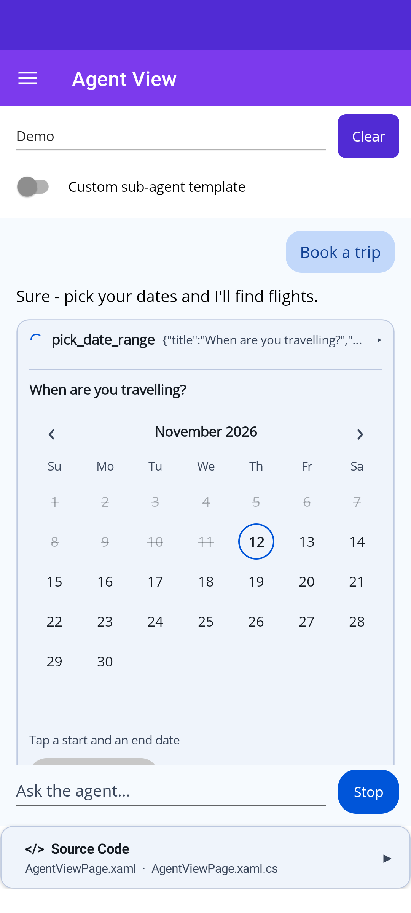 |
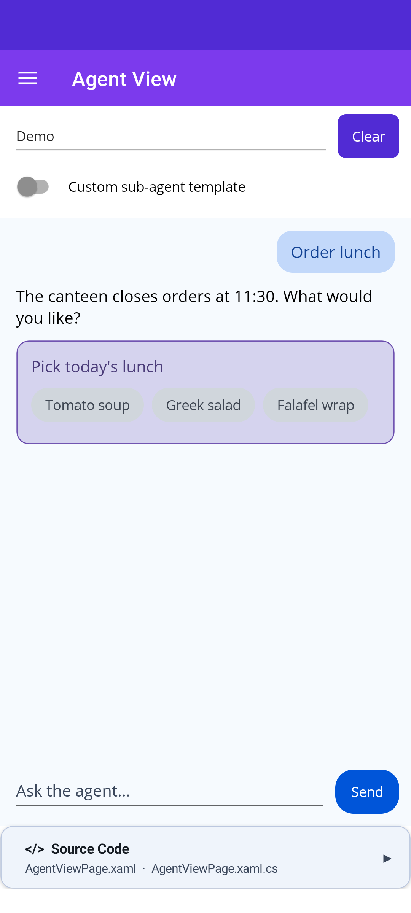 |
 |
 |
A2UISurfaceView
Section titled “A2UISurfaceView”An A2UI agent sends declarative JSON: a flat list of components, a data model, bindings and actions. A2UISurfaceView draws it, writes what the user types back into the data model, and sends button presses back to the agent as actions. It is declarative JSON only, never code. The agent can only place components the app registered.
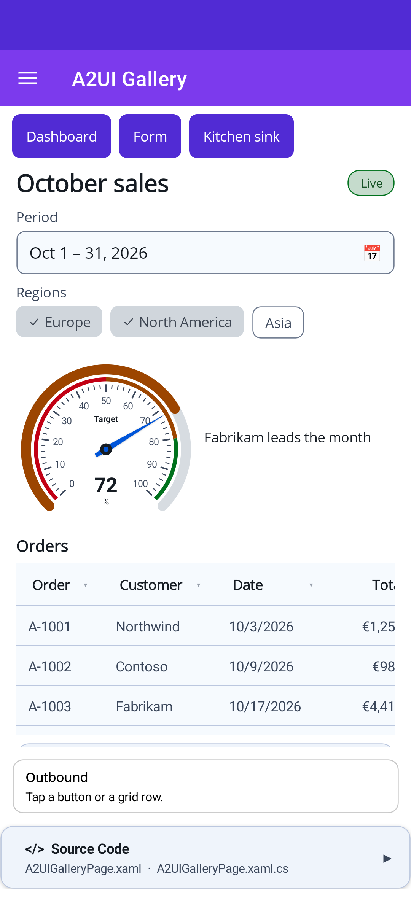
{ "version": "1.0", "createSurface": { "surfaceId": "dashboard", "catalogId": "https://shinylib.net/a2ui/shiny.controls/v1.json", "dataModel": { "target": { "percent": 72 }, "orders": [ { "id": "A-1001", "customer": "Northwind", "total": 1250.5, "status": "Shipped" }, { "id": "A-1002", "customer": "Contoso", "total": 980, "status": "Pending" } ] }, "components": [ { "id": "root", "component": "Column", "children": ["gauge", "grid"] }, { "id": "gauge", "component": "Gauge", "label": "Target", "units": "%", "min": 0, "max": 100, "value": { "@path": "/target/percent" } }, { "id": "grid", "component": "DataGrid", "title": "Orders", "rows": { "@path": "/orders" }, "columns": [ { "key": "customer", "header": "Customer" }, { "key": "total", "header": "Total", "format": "currency", "currency": "EUR" }, { "key": "status", "header": "Status" } ], "rowAction": { "event": { "name": "openOrder", "context": { "orderId": { "@path": "id" } } } } } ] }}AgentView hosts surfaces that arrive in a conversation (as a2ui-surface activities). On its own, it works with any
transport:
var host = new A2UISurfaceHost(new A2UICatalogRegistry().Add(A2UICatalog.CreateShiny()));host.Outbound += (_, m) => SendToAgent(m.Message); // actions, errors, function callshost.Apply(json); // createSurface / updateComponents / updateDataModel / ...<shiny:A2UISurfaceView x:Name="Surface" /> <!-- Surface.Host = host; Surface.SurfaceId = "dashboard"; --><A2UISurfaceView Host="@host" SurfaceId="dashboard" />Catalogs
Section titled “Catalogs”| Catalog | Components |
|---|---|
Basic (https://a2ui.org/specification/v1_0/catalogs/basic/catalog.json) |
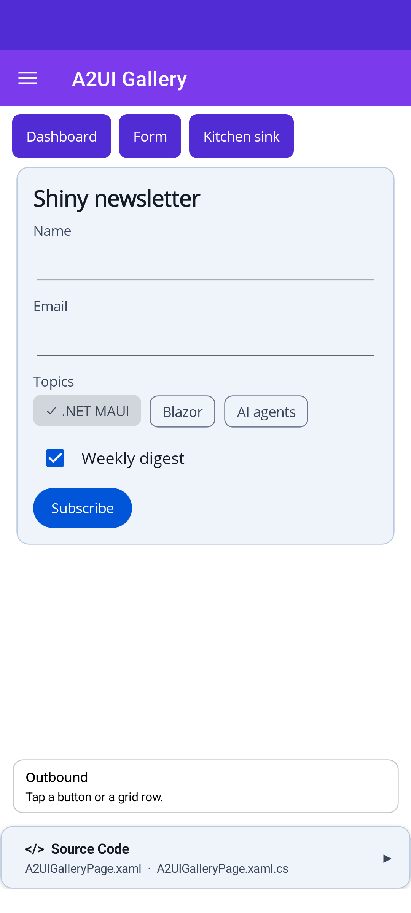
Text, Image, Icon, Video, AudioPlayer, Row, Column, List, Card, Tabs, Divider, Modal, Button, TextField, CheckBox, ChoicePicker, Slider, DateTimeInput |
Shiny (https://shinylib.net/a2ui/shiny.controls/v1.json) |
Everything in basic, plus DataGrid, Gauge, ProgressBar, Pill, Avatar, ChipGroup, TagEntry, DateRangePicker, RangeSlider, Timeline, Expander, Markdown |
The Shiny components render with the real controls. DataGrid formats number, currency, percent and date
columns in the user’s culture and sends rowAction with the tapped row as its scope. DateRangePicker, ChipGroup,
TagEntry, RangeSlider and Expander write back to their bindings. Give the agent the catalog schema from
A2UICatalog.CreateShiny().Definition, also published at
shinylib.net/a2ui/shiny.controls/v1.json.
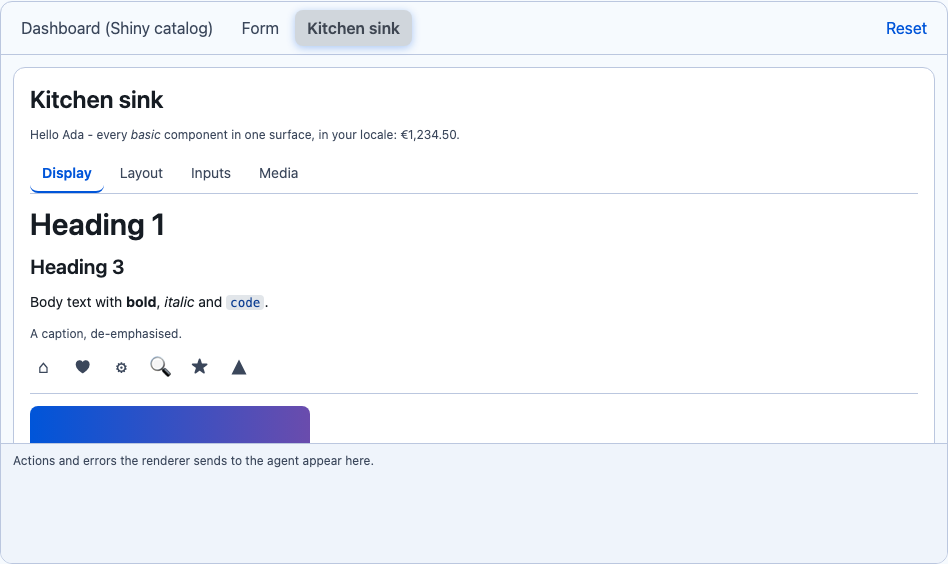
| Shiny catalog | Basic catalog form | Kitchen sink (Blazor) |
|---|---|---|
 |
 |
 |
Register your own components, and add them to a catalog so the agent knows about them:
// MAUIrenderers.Register("Rating", ctx => new RatingView { Value = ctx.Number("value") ?? 0 });// Blazorrenderers.Register<MyRating>("Rating"); // a component with an A2UIRenderContext Context parameterConformance
Section titled “Conformance”- Nothing renders until
rootexists. Unknown components show an “unsupported component” placeholder and reportVALIDATION_FAILED. allowedParents/allowedChildren, required properties,allowedCallersandrequiresUserActivationare enforced, soopenUrlonly runs from a tap.regexuses the spec’s dialect, with its safety rules checked first. Media URLs must pass the spec’s URL policy.- Inputs write to the local data model immediately. The model goes to the agent only with an action, and only when
the surface set
sendDataModel. @accessibilitymaps toSemanticPropertieson MAUI and to ARIA on Blazor.
Inside AgentView, surfaces size to their content and never scroll vertically. On MAUI, a DataGrid with more than 12 rows shows 12 and a “Show all” link that opens the rest in a modal. A root Card drops its edge inside a message.
Samples
Section titled “Samples”The Agent View page in the MAUI and Blazor samples (live in the Blazor Playground and the MAUI web sample) switches between four sources:
- A scripted demo agent that shows every feature with no key.
- Recordings of a real
AGUI.Server. - A live AG-UI endpoint URL.
- Your own OpenAI-compatible key. A real model runs in-process through
AGUI.Server(in the browser on the Blazor WebAssembly sample), draws A2UI surfaces from the Shiny catalog through arender_uitool, and asks questions through the built-in UI tools. The key stays in memory and goes only to the endpoint you typed.
Running AGUI.Server in a trimmed WebAssembly app needs <TrimmerRootAssembly Include="AGUI.Abstractions" /> in the
app’s project; without it, every run fails in a published build.
Get started
Section titled “Get started”<PackageReference Include="Shiny.Maui.Controls.Agents" Version="*-*" /><!-- or --><PackageReference Include="Shiny.Blazor.Controls.Agents" Version="*-*" />The AgentView and A2UI Surface pages have the full property, template and event reference. Questions and requests go to shinyorg/controls.