
Fab & FabMenu
A Material Design-inspired floating action button (Fab) and a multi-action menu (FabMenu) that animates up from a main FAB with a staggered reveal. Each action supports Icon, Text, and Command, plus full color and border customization.

| Closed | Menu Open |
|---|---|
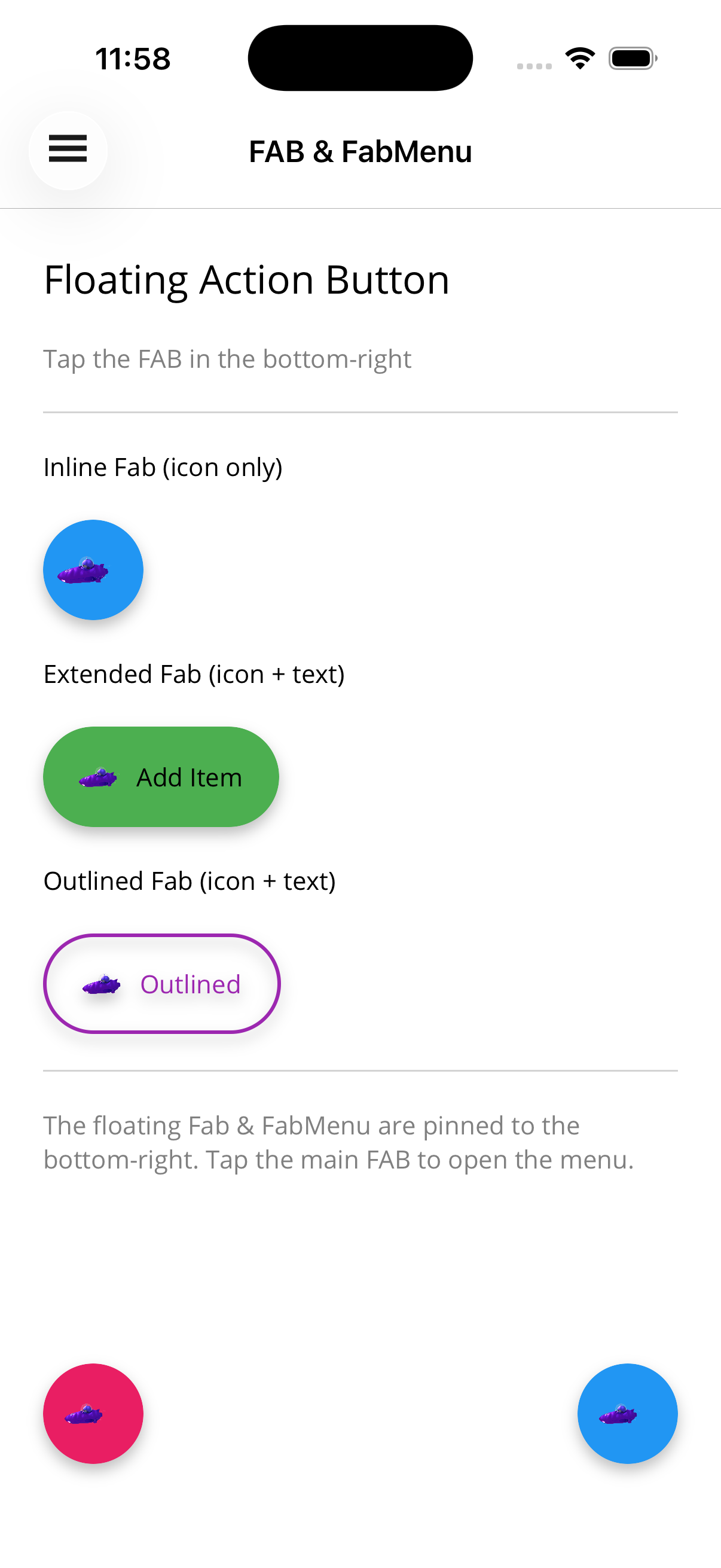 | 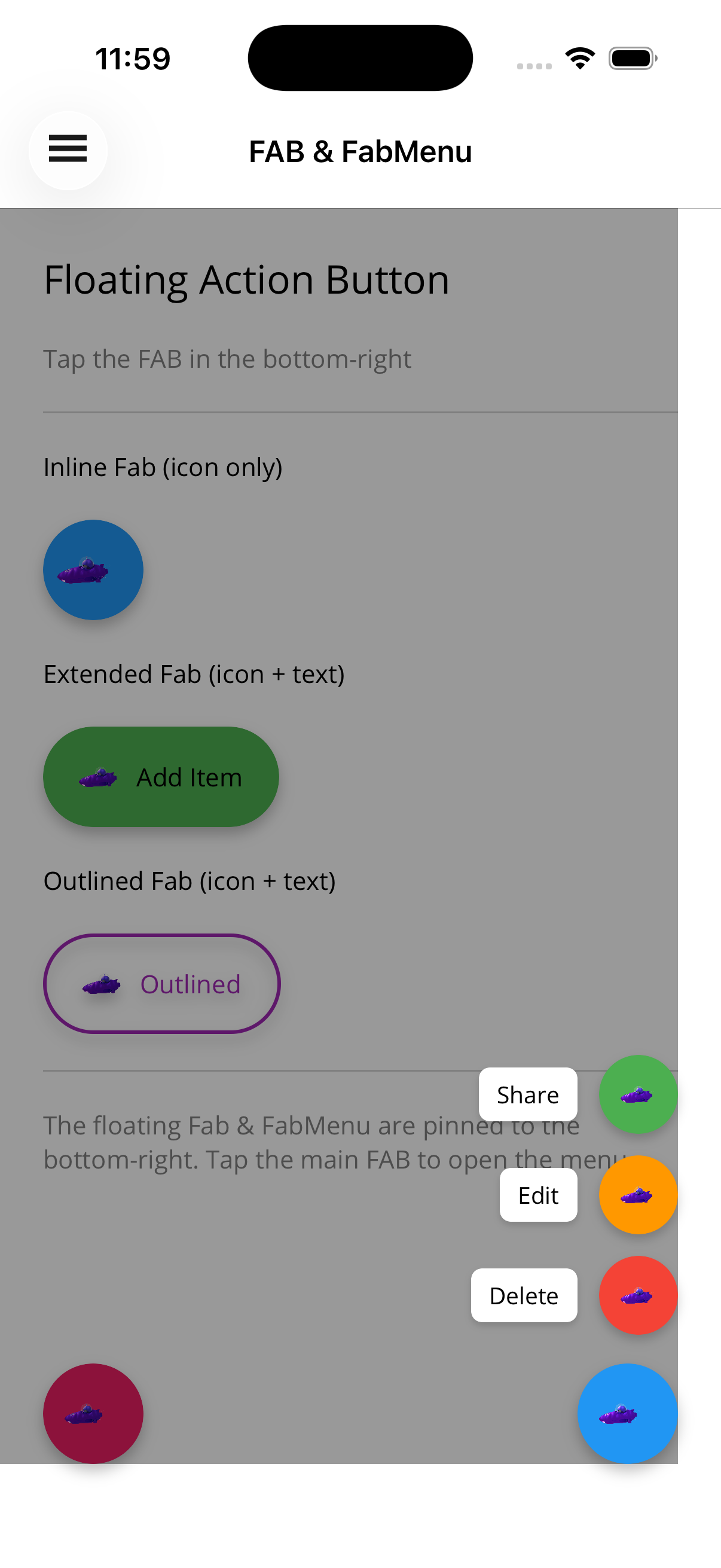 |
A single floating action button. Tap triggers Command (and fires the Clicked event).
<!-- Icon-only circular Fab --><shiny:Fab Icon="add.png"           FabBackgroundColor="#E91E63"           Command="{Binding AddCommand}"           HorizontalOptions="End"           VerticalOptions="End"           Margin="24" />
<!-- Extended Fab with text --><shiny:Fab Icon="add.png"           Text="Add Item"           FabBackgroundColor="#4CAF50"           TextColor="White"           Command="{Binding AddCommand}"           HorizontalOptions="End"           VerticalOptions="End"           Margin="24" />
<!-- Outlined Fab --><shiny:Fab Text="Save"           FabBackgroundColor="Transparent"           BorderColor="#9C27B0"           BorderThickness="2"           TextColor="#9C27B0"           Command="{Binding SaveCommand}" />
Fab Properties
Section titled “Fab Properties”| Property | Type | Default | Description |
|---|---|---|---|
Icon | ImageSource? | null | Icon displayed inside the button |
Text | string? | null | Optional label; when null the Fab is a perfect circle |
Command | ICommand? | null | Executed on tap |
CommandParameter | object? | null | Parameter forwarded to the Command |
FabBackgroundColor | Color | #2196F3 | Fill color |
BorderColor | Color? | null | Outline stroke color |
BorderThickness | double | 0 | Outline stroke thickness |
TextColor | Color | White | Label text color |
FontSize | double | 14 | Label font size |
FontAttributes | FontAttributes | None | Label font attributes |
Size | double | 56 | Height of the Fab (diameter when circular) |
IconSize | double | 24 | Icon image size |
HasShadow | bool | true | Drop shadow on/off |
Events: Clicked.
FabMenu
Section titled “FabMenu”A main Fab plus one or more FabMenuItem children that animate up (staggered) when the menu opens. IsOpen is two-way bindable.
<shiny:FabMenu IsOpen="{Binding IsMenuOpen}" Icon="plus.png" FabBackgroundColor="#2196F3" HorizontalOptions="End" VerticalOptions="End" Margin="24"> <shiny:FabMenuItem Icon="share.png" Text="Share" FabBackgroundColor="#4CAF50" Command="{Binding ShareCommand}" /> <shiny:FabMenuItem Icon="edit.png" Text="Edit" FabBackgroundColor="#FF9800" Command="{Binding EditCommand}" /> <shiny:FabMenuItem Icon="delete.png" Text="Delete" FabBackgroundColor="#F44336" Command="{Binding DeleteCommand}" /></shiny:FabMenu>Tapping the main Fab toggles IsOpen. Tapping a FabMenuItem executes its Command, raises ItemTapped, and (by default) closes the menu.
FabMenu Properties
Section titled “FabMenu Properties”In addition to all main-Fab pass-throughs (Icon, Text, FabBackgroundColor, BorderColor, BorderThickness, TextColor):
| Property | Type | Default | Description |
|---|---|---|---|
IsOpen | bool | false | Two-way bindable; opens/closes with animation |
Items | IList<FabMenuItem> | empty | Content property — place items directly inside <shiny:FabMenu> |
HasBackdrop | bool | true | Show dim backdrop behind the menu |
BackdropColor | Color | Black | Backdrop color |
BackdropOpacity | double | 0.4 | Backdrop peak opacity |
CloseOnBackdropTap | bool | true | Close when backdrop tapped |
CloseOnItemTap | bool | true | Close after item tap |
AnimationDuration | uint | 200 | Duration (ms) of open/close animation |
Events: ItemTapped(FabMenuItem).
Methods: Open(), Close(), Toggle().
FabMenuItem
Section titled “FabMenuItem”An action inside the menu — icon button plus side label.
FabMenuItem Properties
Section titled “FabMenuItem Properties”| Property | Type | Default | Description |
|---|---|---|---|
Icon | ImageSource? | null | Icon rendered inside the circular button |
Text | string? | null | Side label |
Command | ICommand? | null | Invoked on tap |
CommandParameter | object? | null | Parameter forwarded to the Command |
FabBackgroundColor | Color | #2196F3 | Icon button fill |
BorderColor | Color? | null | Icon button outline |
BorderThickness | double | 0 | Icon button outline thickness |
TextColor | Color | Black | Side-label text color |
LabelBackgroundColor | Color | White | Side-label fill color |
FontSize | double | 13 | Side-label font size |
Size | double | 44 | Icon button diameter |
IconSize | double | 20 | Icon image size |
Events: Clicked.
Placement
Section titled “Placement”Place Fab / FabMenu inside a Grid that fills the page — the same pattern used by BottomSheetView / ImageViewer — so the FabMenu’s backdrop can cover the main content.
<ContentPage>    <Grid>        <!-- Main page content -->        <ScrollView>            <!-- ... -->        </ScrollView>
        <!-- Fab/FabMenu overlay on top -->        <shiny:FabMenu IsOpen="{Binding IsMenuOpen}"                       Icon="plus.png"                       HorizontalOptions="End"                       VerticalOptions="End"                       Margin="24">            <!-- items -->        </shiny:FabMenu>    </Grid></ContentPage>
AI Skill
Section titled “AI Skill”Step 1 — Add the marketplace:
claude plugin marketplace add shinyorg/skills Step 2 — Install the plugin:
claude plugin install shiny-maui@shiny Coming soon — Copilot plugin install instructions will be added here.